How to Use Lambda Authorizers to Validate Microsoft EntraID (Azure AD) Tokens in Amazon API Gateway
Sometimes, we need custom or flexible authorization logic that goes beyond the built-in capabilities of Amazon API Gateway, such as AWS IAM Authorizer, Amazon Cognito User Pools Authorizer, or API Gateway Resource Policies. For these scenarios, Lambda Authorizers can be a great fit. There are two types:
Request-based: The authorizer receives different parts of the request, such as headers, query string parameters, and body. That allows for building complex authorization logic.
Token-based: The authorizer receives only a token, usually JWTs or OAuth tokens. Typically performs better than the request-based type due to a reduced input size and simple caching logic.
Regardless of the type, the authorization process follows these steps:
A client sends a request to the Amazon API Gateway
The Lambda authorizer is invoked and performs the validation logic.
The Lambda authorizer generates an IAM policy granting or denying access.
The API Gateway determines whether the request is allowed or denied based on the policy.
With this understanding, let's build our own Lambda authorizer to validate a token generated by Microsoft Entra ID and secure our Amazon API Gateway endpoints.
Pre-requisites
An IAM User with programmatic access.
Install the AWS CLI.
Install the Amazon Lambda Templates (
dotnet new -i Amazon.Lambda.Templates)Install the Amazon Lambda Tools (
dotnet tool install -g Amazon.Lambda.Tools)Install AWS SAM CLI.
A registered application in Microsoft Entra ID.
The Lambda function
First, let's build the Lambda function behind the Amazon API Gateway. Run the following commands to set up our Lambda function:
dotnet new lambda.EmptyFunction -n MyLambda -o .
dotnet add src/MyLambda package Amazon.Lambda.APIGatewayEvents
dotnet new sln -n MyApplications
dotnet sln add --in-root src/MyLambda
Open the Program.cs file and update the content as follows:
using Amazon.Lambda.APIGatewayEvents;
using Amazon.Lambda.Core;
using System.Text.Json;

[assembly: LambdaSerializer(typeof(Amazon.Lambda.Serialization.SystemTextJson.DefaultLambdaJsonSerializer))]

namespace MyLambda;

public class Function
{
    public APIGatewayHttpApiV2ProxyResponse FunctionHandler(APIGatewayHttpApiV2ProxyRequest input, ILambdaContext context)
    {
        context.Logger.LogInformation(JsonSerializer.Serialize(input));
        return new APIGatewayHttpApiV2ProxyResponse
        {
            Body = @"{""Message"":""Hello World""}",
            StatusCode = 200,
            Headers = new Dictionary<string, string> { { "Content-Type", "application/json" } }
        };
    }
}
The Authorizer Lambda function
Run the following commands:
dotnet new lambda.EmptyFunction -n MyAuthorizerLambda -o .
dotnet add src/MyAuthorizerLambda package Amazon.Lambda.APIGatewayEvents
dotnet add src/MyAuthorizerLambda package Microsoft.IdentityModel.Protocols.OpenIdConnect
dotnet sln add --in-root src/MyAuthorizerLambda
Open the Program.cs file and update the content as follows:
using Amazon.Lambda.Core;
using Microsoft.IdentityModel.Protocols.OpenIdConnect;
using Microsoft.IdentityModel.Protocols;
using Amazon.Lambda.APIGatewayEvents;
using Microsoft.IdentityModel.Tokens;
using System.IdentityModel.Tokens.Jwt;

// Assembly attribute to enable the Lambda function's JSON input to be converted into a .NET class.
[assembly: LambdaSerializer(typeof(Amazon.Lambda.Serialization.SystemTextJson.DefaultLambdaJsonSerializer))]

namespace MyAuthorizerLambda;

public class Function
{
    private string _tenantId;
    private string _clientId;
    private ConfigurationManager<OpenIdConnectConfiguration> _configurationManager;

    public Function()
    {
        _tenantId = Environment.GetEnvironmentVariable("TENANT_ID")!;
        _clientId = Environment.GetEnvironmentVariable("CLIENT_ID")!;
        string metadataEndpoint = $"https://login.microsoftonline.com/{_tenantId}/v2.0/.well-known/openid-configuration";
        _configurationManager = new ConfigurationManager<OpenIdConnectConfiguration>(metadataEndpoint, new OpenIdConnectConfigurationRetriever());
    }

    public async Task<APIGatewayCustomAuthorizerResponse> FunctionHandler(APIGatewayCustomAuthorizerRequest request, ILambdaContext context)
    {
        var authorized = false;
        var principalId = "user";
        try
        {
            var openIdConnectConfiguration = await _configurationManager.GetConfigurationAsync();
            var validationParameters = new TokenValidationParameters
            {
                ValidateAudience = true,
                ValidateIssuer = true,
                ValidateIssuerSigningKey = true,
                ValidateLifetime = true,
                ValidAudience = $"api://{_clientId}",
                IssuerSigningKeys = openIdConnectConfiguration.SigningKeys,
                ValidIssuer = $"https://sts.windows.net/{_tenantId}/"
            };
            var tokenHandler = new JwtSecurityTokenHandler();
            var principal = tokenHandler.ValidateToken(request.AuthorizationToken, validationParameters, out var securityToken);
            authorized = true;
            principalId = principal.Identity?.Name;
        }
        catch (Exception ex)
        {
            context.Logger.LogError($"Error occurred validating token: {ex.Message}");
            authorized = false;
        }
        var policy = new APIGatewayCustomAuthorizerPolicy
        {
            Version = "2012-10-17",
            Statement =
            [
                new APIGatewayCustomAuthorizerPolicy.IAMPolicyStatement
                {
                    Action = new HashSet<string>(new string[] { "execute-api:Invoke" }),
                    Effect = authorized ? "Allow" : "Deny",
                    Resource = new HashSet<string>(new string[] { request.MethodArn })
                }
            ]
        };
        var contextOutput = new APIGatewayCustomAuthorizerContextOutput
        {
            ["Path"] = request.MethodArn
        };
        return new APIGatewayCustomAuthorizerResponse
        {
            PrincipalID = principalId,
            Context = contextOutput,
            PolicyDocument = policy
        };
    }
}
A brief description of what we are doing here:
The
APIGatewayCustomAuthorizerRequestclass receives the request from the AWS API Gateway.The signing keys are retrieved using the information provided by the .well-known endpoint.
The
TokenValidationParametersclass specifies what we need to validate from the token.The
JwtSecurityTokenHandlerclass validates and reads the token.The
APIGatewayCustomAuthorizerResponseis used as a response and includes:APIGatewayCustomAuthorizerPolicy: Represents the IAM policy denying or allowing access to a resource. Defining the right resource determines how generic and reusable the Lambda authorizer can be.APIGatewayCustomAuthorizerContextOutput: Amazon API Gateway sends this object to the backend Lambda function as part of the input.PrincipalID: The user identification associated with the token.
AWS SAM template
Create a template.yml file with the following content:
AWSTemplateFormatVersion: '2010-09-09'
Transform: AWS::Serverless-2016-10-31
Description: >
  SAM

Resources:
  MyApi:
    Type: AWS::Serverless::Api
    Properties:
      StageName: Prod
      Auth:
        Authorizers:
          MyAuthorizerLambda:
            FunctionArn: !GetAtt MyAuthorizerFunction.Arn

  MyApiFunction:
    Type: AWS::Serverless::Function
    Properties:
      Timeout: 60
      MemorySize: 512
      Tracing: Active
      Runtime: dotnet8
      Architectures:
        - x86_64
      Handler: MyLambda::MyLambda.Function::FunctionHandler
      CodeUri: ./src/MyLambda/
      Events:
        Get:
          Type: Api
          Properties:
            RestApiId: !Ref MyApi
            Path: /hello-world
            Method: get
            Auth:
              Authorizer: MyAuthorizerLambda

  MyAuthorizerFunction:
    Type: AWS::Serverless::Function
    Properties:
      Environment:
        Variables:
          TENANT_ID: "<MY_TENANT_ID>"
          CLIENT_ID: "<MY_CLIENT_ID>"
      Timeout: 60
      MemorySize: 512
      Tracing: Active
      Runtime: dotnet8
      Architectures:
        - x86_64
      Handler: MyAuthorizerLambda::MyAuthorizerLambda.Function::FunctionHandler
      CodeUri: ./src/MyAuthorizerLambda/

Outputs:
  MyApiEndpoint:
    Description: "API endpoint"
    Value: !Sub "https://${MyApi}.execute-api.${AWS::Region}.amazonaws.com/Prod/hello-world"
The resources defined in the file are:
The Lambda authorizer corresponds to the resource named
MyAuthorizerFunction. TheApplicationID/ClientIDand theDirectoryID/TenantIDcome from the App Registration in Microsoft Entra ID.Inside the
AWS::Serverless::Apiresource, theAuthproperty defines a list ofAuthorizers. In this case, theMyAuthorizerLambdaauthorizer points to the previous resource.Finally, the Lambda function behind the Amazon API Gateway is the MyApiFunction resource, which uses the
MyAuthorizerLambdaauthorizer defined atAWS::Serverless::Apilevel.
Run the following commands to deploy the resources to AWS:
sam build
sam deploy --guided
Testing
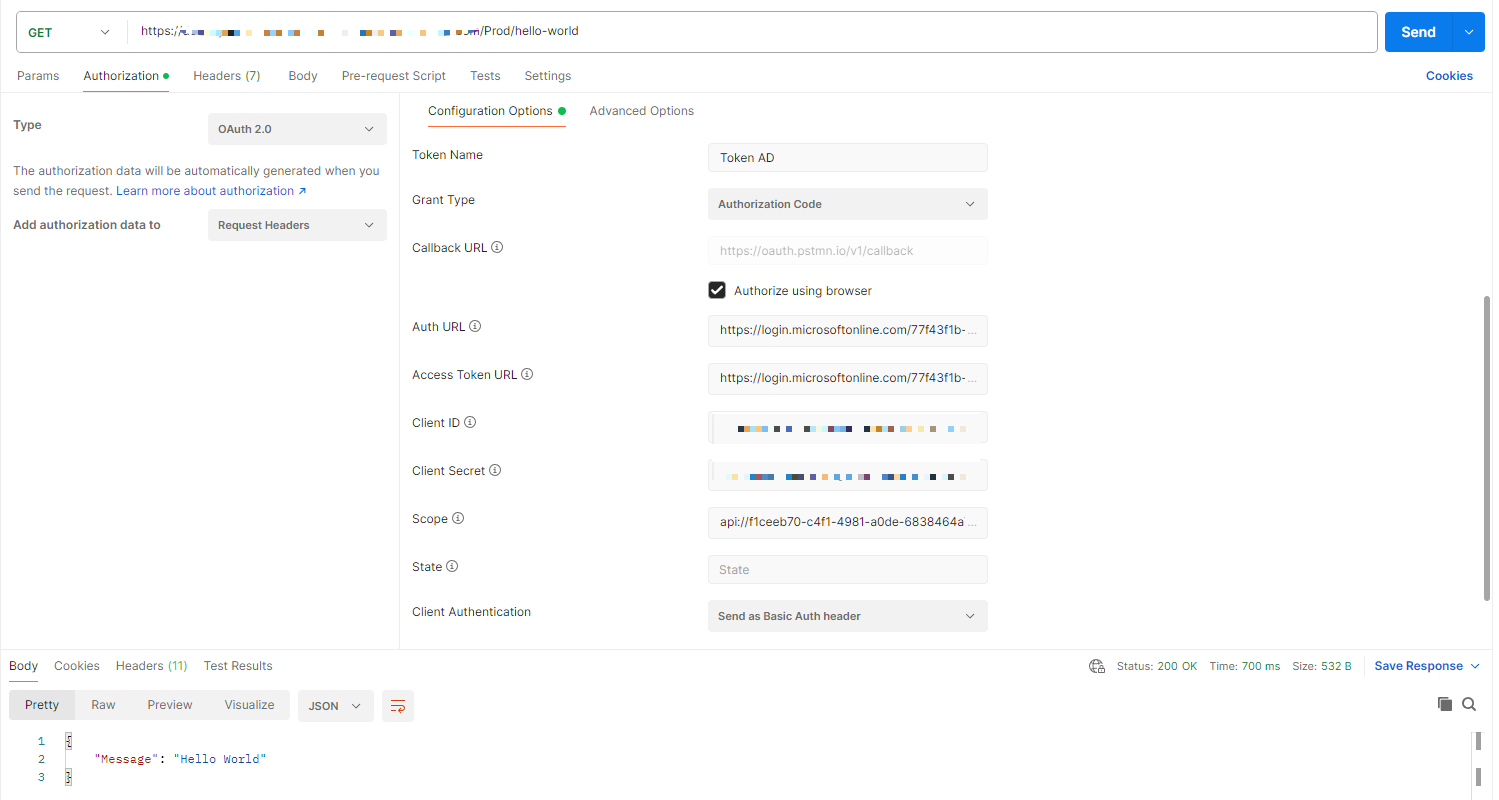
In this case, we are using Postman to generate the token and include it in our request to the endpoint:
You can find the code and scripts here. Thank you, and happy coding.
About the author
Somebody who likes to code
Comments
Join the discussionNo comments yet. Be the first to comment.



