Migrating SQL Server to PostgreSQL with AWS DMS: A Hands-On Guide for C# Developers
Introduction
The problem
Moving a production database from one engine to another looks simple on a whiteboard: read every row from the old database and write it to the new one. In practice, a naive approach breaks down quickly:
Volume. A
SELECT */INSERTloop written in C# will not move a billion rows in an acceptable time. You need parallel reads, bulk writes, buffering, and retries.Type differences. SQL Server and PostgreSQL disagree on types (
uniqueidentifiervsuuid,datetime2vstimestamp,nvarchar(max)vstext,bitvsboolean). Every mismatch has to be converted correctly.Naming differences. .NET schemas on SQL Server usually use
PascalCase, while PostgreSQL schemas generated by EF Core with snake_case naming usesnake_case. Every table and column must be mapped.Repeatability. You will not get the migration right the first time. You will load, validate, fix, truncate, and reload many times in
devandqabefore the production cutover. Each attempt has to be identical.Correctness after the load. Foreign keys, indexes, and identity sequences all need attention, or the application fails on its first write after cutover.
What we will do
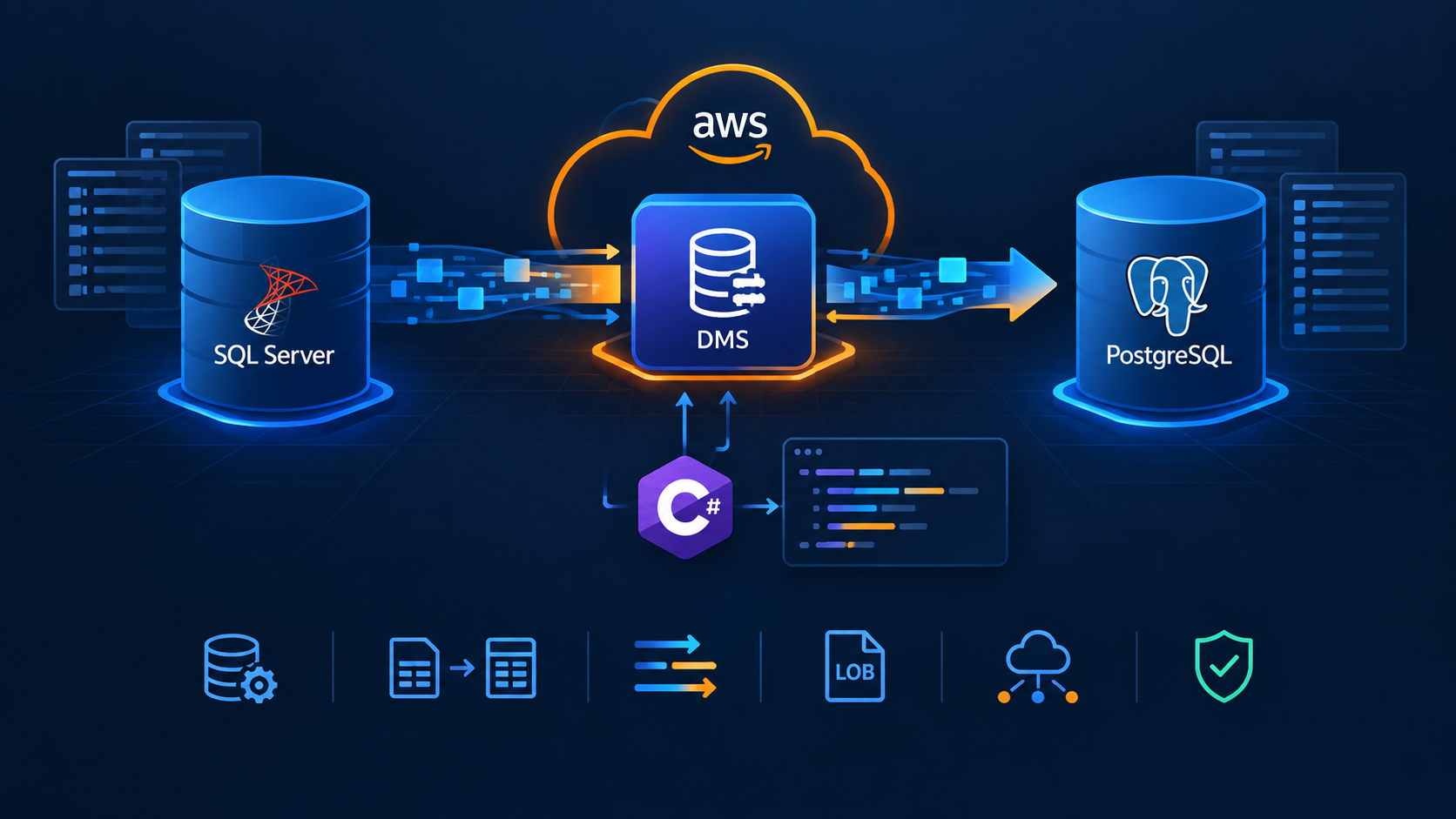
This guide walks through a complete, realistic migration of the fictional Acme Commerce order database from SQL Server to PostgreSQL. The migration has four phases:
Prepare the target: Create the empty schema and drop FKs and secondary indexes.
Provision DMS: Create endpoints, network (SG, subnets), replication instance and replication tasks.
Load the data: Start the tasks and monitor progress.
Finalize the target: Recreate indexes and FKs, reset identity sequences, validate row counts and tear down DMS resources.
We will automate phases 1, 2, and 4 with one C# console application. It can provision, update, and delete the AWS resources, and run the SQL scripts on the target, from a single command-line interface. Phase 3 (starting and watching the load) stays a deliberate manual step.
By the end you will understand:
What each DMS component does and how the components depend on each other.
How to describe which data moves and how it is renamed (table mappings).
How to tune how fast and how safely it moves (task settings, parallel load, LOB handling).
How to write provisioning code that can be re-run safely.
Which mistakes cost the most time on a first DMS project, and how to avoid them.
What we will use
| Tool | Role in this guide | Why this tool |
|---|---|---|
| AWS Database Migration Service (DMS) | Reads from SQL Server, converts types, and bulk-loads PostgreSQL. | A managed engine built for this job. It handles parallelism, buffering, type conversion, and restarts, so you don't have to write a data pump. |
| .NET / C# | The provisioning and orchestration tool. | Your team already knows it. Code review, debugging, testing, and CI work the same as for any other project. |
AWS SDK for .NET (AWSSDK.DatabaseMigrationService, AWSSDK.EC2) |
Creates and manages DMS and network resources from code. | Typed request and response objects, async APIs, and the standard AWS credential chain. |
| Npgsql + Dapper | Runs the pre- and post-load SQL scripts on PostgreSQL. | Lightweight, with no ORM needed for running static scripts, and no dependency on psql being installed. |
| Microsoft.Extensions.Configuration | Binds appsettings.json to strongly typed options. |
The same configuration model as ASP.NET Core, with one file per environment. |
| JSON table mappings | Declares which tables move and how they are renamed and partitioned. | The native DMS format. Keeping one file per task makes it versionable and reviewable. |
| SQL scripts | Drop and restore constraints, reset sequences, validate data. | Some work belongs in the database, not in DMS. See section 15. |
Why this approach
Why DMS instead of a custom C# data pump? DMS already solves the hard, low-level problems: parallel unloads, bulk inserts, type conversion, LOB streaming, checkpoints, and logging to CloudWatch. Writing and tuning a reliable equivalent takes weeks. With DMS, your work moves to configuration, which is much easier to review and change.
Why a C# provisioner instead of clicking through the AWS console? The console is fine for exploring, but it doesn't scale to a migration you'll repeat dozens of times across three environments. Clicked settings can't be reviewed, compared between runs, or reproduced reliably. A config-driven tool turns the whole setup into one command that can be reviewed in a pull request.
Why not only Terraform or CloudFormation? Infrastructure-as-code tools handle AWS resources well, but a migration also needs database steps (dropping foreign keys, rebuilding indexes, resetting sequences) in a specific order around the load. A single C# tool can orchestrate both kinds of step. If your organization standardizes on Terraform, the DMS concepts and JSON documents in this guide still apply directly.
Why a full load instead of continuous replication (CDC)? Acme can stop writes during a maintenance window, and a full load is the simplest and most predictable DMS mode. CDC adds source-side requirements (transaction-log access or SQL Server CDC) and more moving parts. Section 2 explains when you would choose it instead.
Prerequisites
Working knowledge of C# (async/await, records/classes, LINQ) and basic SQL.
An AWS account with permissions for DMS and EC2 (security groups) in the target VPC.
Network connectivity from the VPC to both databases (the replication instance must reach SQL Server on 1433 and PostgreSQL on 5432).
A SQL Server login with
SELECTon the source schemas, and a PostgreSQL user that canINSERTandTRUNCATEon the target tables.
No prior experience with DMS is assumed. Every concept is introduced before it is used in code.
1. The Case Study: Acme Commerce
Acme Commerce runs its order-management system on SQL Server. The team is moving it to Amazon RDS for PostgreSQL. The new PostgreSQL schema already exists because the application's EF Core migrations created it, and it follows PostgreSQL naming conventions (snake_case).
| SQL Server (source) | Rows | PostgreSQL (target) | Notes |
|---|---|---|---|
sales.Orders |
80M | sales.orders |
Sequential GUID PK, one nvarchar(max) column |
sales.OrderLines |
1.2B | sales.order_lines |
Largest table, sequential GUID PK |
sales.Payments |
60M | sales.payments |
|
catalog.Products |
200K | catalog.products |
Contains a rowversion column that does not exist in PostgreSQL |
catalog.Categories |
2K | catalog.categories |
Identity PK |
audit.Events |
30M | audit.events |
Large JSON payloads in nvarchar(max) |
Requirements:
A one-time full load. There is no ongoing replication, because the cutover happens during a maintenance window.
Column names must go from
PascalCase/ EF owned-type style (Shipping_Address_City) tosnake_case(shipping_address_city).OrderLinesis too large to load in a single stream, so it must be loaded in parallel.The whole setup must be reproducible across
dev,qa, andprod.
2. DMS Concepts You Must Understand First
DMS has five core building blocks. Most early mistakes come from mixing them up.
| Concept | What it is | Analogy for a C# developer |
|---|---|---|
| Endpoint | Connection information (engine, host, port, DB, user, password, SSL) for the source or the target. | A connection string that DMS stores. |
| Replication instance | A managed VM that runs the DMS engine. It reads from the source and writes to the target. CPU, memory, and disk on this VM limit throughput. | The worker process that runs the migration. |
| Replication subnet group | The VPC subnets (in at least two Availability Zones) where the instance can be placed. | Deployment placement. |
| Security group | Firewall rules attached to the instance. | Network ACL. |
| Replication task | The unit of work: which tables to move (table mappings), how to move them (task settings), and the migration type. | A job definition. |
Migration types
| Type | Behaviour | When to use |
|---|---|---|
full-load |
Copies the existing data once, then stops. | Cutover inside a maintenance window. This is our case. |
cdc |
Replicates only ongoing changes. The source needs CDC or transaction-log access. | Keeping systems in sync after a separate bulk load. |
full-load-and-cdc |
Bulk copy first, then continuous replication. | Near-zero-downtime cutovers. |
Key insight: DMS is a data mover, not a schema migration tool. It can create simple tables, but it does not reproduce defaults, secondary indexes, foreign keys, or identity sequences faithfully. In production migrations, create the target schema yourself (EF migrations, SQL scripts, or the AWS Schema Conversion Tool) and let DMS load only the rows.
Two JSON documents drive every task
Table mappings describe what to migrate and how to transform names. See section 11.
Task settings describe how the engine behaves: LOB handling, commit size, parallelism, and logging. See section 12.
Both are passed to the API as JSON strings. You will generate or load them from C#.
3. Why Provision DMS from C#?
You could click through the AWS console, or use Terraform or CloudFormation. A small C# tool is still a good fit for migrations because:
Migrations are iterative. You will drop and reload the target many times while you tune settings. You need a one-command way to reapply configuration.
You need non-infrastructure steps anyway. Examples are dropping foreign keys before the load and resetting sequences after it. A single tool can orchestrate both the AWS calls and the SQL calls.
Your team already knows C#. Code review, debugging, and extending the tool follow normal workflows.
The trade-off is that you own the idempotency logic. Terraform provides it for free. Section 7 shows how to implement it.
4. Project Setup
dotnet new console -n Acme.DmsProvisioner
cd Acme.DmsProvisioner
dotnet add package AWSSDK.DatabaseMigrationService
dotnet add package AWSSDK.EC2
dotnet add package Npgsql
dotnet add package Dapper
dotnet add package Microsoft.Extensions.Configuration.Json
dotnet add package Microsoft.Extensions.Configuration.Binder
Packages:
AWSSDK.DatabaseMigrationServiceis the typed client for every DMS API: endpoints, instances, and tasks.AWSSDK.EC2is used to create and look up the security group.NpgsqlandDapperrun the pre- and post-load SQL scripts against PostgreSQL.Microsoft.Extensions.Configuration.*bindsappsettings.jsonto strongly typed classes.
Non-code files (JSON mappings and SQL scripts) must be copied next to the executable:
<ItemGroup>
  <None Update="appsettings.json" CopyToOutputDirectory="Always" />
  <None Update="mappings\*.json"  CopyToOutputDirectory="Always" />
  <None Update="sql\*.sql"        CopyToOutputDirectory="Always" />
</ItemGroup>
Why this matters: At runtime the app resolves files through AppContext.BaseDirectory (the bin or publish folder), not the project folder. If you forget CopyToOutputDirectory, you get a FileNotFoundException on the build server even though the code works in your IDE.
Common mistake: Using wildcards and then publishing with
PublishSingleFile=true. The JSON and SQL files are not embedded in the single-file executable. You must ship them alongside it.
5. Modelling Configuration
Keep everything that is not secret in appsettings.json, and give it strong types.
namespace Acme.DmsProvisioner;

internal sealed class AppOptions
{
    public AwsOptions Aws { get; set; } = new();
    public EndpointOptions Source { get; set; } = new() { EngineName = "sqlserver", Port = 1433, SslMode = "none" };
    public EndpointOptions Target { get; set; } = new() { EngineName = "postgres",  Port = 5432, SslMode = "require" };
    public SecurityGroupOptions SecurityGroup { get; set; } = new();
    public ReplicationSubnetGroupOptions ReplicationSubnetGroup { get; set; } = new();
    public ReplicationInstanceOptions ReplicationInstance { get; set; } = new();
    public List<ReplicationTaskOptions> ReplicationTasks { get; set; } = [];
}

internal sealed class EndpointOptions
{
    public string EndpointId { get; set; } = string.Empty;
    public string EngineName { get; set; } = string.Empty;
    public string ServerName { get; set; } = string.Empty;
    public int Port { get; set; }
    public string DatabaseName { get; set; } = string.Empty;
    public string Username { get; set; } = string.Empty;
    public string SslMode { get; set; } = "none";
}
Explanation:
The object graph mirrors the DMS resource graph: two endpoints, network, one instance, and N tasks. Anyone reading the config can see the architecture.
Defaults (
Port = 1433,EngineName = "postgres") keepappsettings.jsonshort and document sensible values in code.There is no
Passwordproperty. Passwords are left out on purpose. See section 6.
The task options are where most of the tuning happens:
internal sealed class ReplicationTaskOptions
{
    public string TaskId { get; set; } = string.Empty;
    public bool Enabled { get; set; } = true;          // lets you toggle tasks without deleting config
    public string? DisplayName { get; set; }           // log label only
    public string MigrationType { get; set; } = "full-load";
    public string TargetTablePrepMode { get; set; } = "TRUNCATE_BEFORE_LOAD";
    public string TableMappingsFile { get; set; } = string.Empty;

    // LOB handling
    public bool FullLobMode { get; set; }
    public int LobMaxSizeKb { get; set; } = 32;
    public int InlineLobMaxSizeKb { get; set; }
    public int LobChunkSizeKb { get; set; } = 64;

    // Throughput
    public int MaxFullLoadSubTasks { get; set; } = 8;   // max 49
    public int CommitRate { get; set; } = 10_000;       // max 50,000
    public int StreamBufferCount { get; set; } = 3;
    public int StreamBufferSizeInMb { get; set; } = 8;

    public bool EnableValidation { get; set; }
    public string TargetLoadSeverity { get; set; } = "LOGGER_SEVERITY_DEFAULT";
    // ...other log components
}
Explanation:
Enableddefaults totrue, so older config entries that don't have the property stay active. Being able to disable one task and re-run only the others is very useful while you iterate.Each property default matches the AWS default. If you omit a value, the behaviour is the same as the console. This avoids surprises.
Put limits in XML comments or plain comments (for example
// max 49). The DMS API rejects out-of-range values with messages that are not always clear.
The matching appsettings.json for Acme:
{
  "Aws": { "Region": "us-east-1" },
  "Source": {
    "EndpointId": "acme-sqlserver-source-dev",
    "ServerName": "sql-dev.acme.internal",
    "DatabaseName": "AcmeOrders",
    "Username": "dms_reader"
  },
  "Target": {
    "EndpointId": "acme-postgres-target-dev",
    "ServerName": "acme-dev.xxxx.us-east-1.rds.amazonaws.com",
    "DatabaseName": "acme_orders",
    "Username": "dms_writer"
  },
  "SecurityGroup": {
    "VpcId": "vpc-0abc...",
    "GroupName": "acme-dms-ri-dev",
    "IngressCidr": "10.20.0.0/16",
    "UseExistingSecurityGroup": false
  },
  "ReplicationSubnetGroup": {
    "SubnetGroupId": "acme-dms-subnets-dev",
    "SubnetIds": [ "subnet-aaa", "subnet-bbb" ],
    "UseExistingReplicationSubnetGroup": false
  },
  "ReplicationInstance": {
    "InstanceId": "acme-dms-ri-dev",
    "InstanceClass": "dms.c5.2xlarge",
    "AllocatedStorage": 100,
    "EngineVersion": "3.5.4",
    "Wait": true
  },
  "ReplicationTasks": [
    {
      "TaskId": "acme-full-load-order-lines-dev",
      "DisplayName": "OrderLines",
      "TableMappingsFile": "mappings/order_lines.json",
      "LobMaxSizeKb": 64,
      "MaxFullLoadSubTasks": 8
    },
    {
      "TaskId": "acme-full-load-orders-dev",
      "DisplayName": "Orders",
      "TableMappingsFile": "mappings/orders.json",
      "LobMaxSizeKb": 128,
      "MaxFullLoadSubTasks": 4
    },
    {
      "TaskId": "acme-full-load-rest-dev",
      "DisplayName": "Rest",
      "TableMappingsFile": "mappings/rest.json",
      "LobMaxSizeKb": 256,
      "MaxFullLoadSubTasks": 8
    }
  ]
}
Why several tasks instead of one? Each task has one set of LOB settings. audit.Events needs a 256 KB LOB buffer, but applying that buffer to 1.2 billion OrderLines rows wastes memory. Splitting tasks by data shape lets you tune each group separately, and lets you restart one group without reloading everything.
Best practice: Keep one
appsettings.{env}.jsonper environment and make resource IDs include the environment (-dev,-qa). DMS identifiers must be unique per account and region. Reusing the same identifier across environments in a shared account overwrites the other environment's resources.
6. Handling Secrets and Credentials
Database passwords and AWS keys must never be in appsettings.json. The simplest safe approach for an operator-run tool is to accept them on the command line or from the environment, and to use the ambient AWS credential chain by default.
AWSCredentials? credentials = secrets.AwsAccessKeyId is null
    ? null
    : secrets.AwsSessionToken is null
        ? new BasicAWSCredentials(secrets.AwsAccessKeyId, secrets.AwsSecretAccessKey)
        : new SessionAWSCredentials(secrets.AwsAccessKeyId, secrets.AwsSecretAccessKey, secrets.AwsSessionToken);

var region = RegionEndpoint.GetBySystemName(options.Aws.Region);

using var dms = credentials is null
    ? new AmazonDatabaseMigrationServiceClient(region)            // ambient chain
    : new AmazonDatabaseMigrationServiceClient(credentials, region);
Explanation:
If no keys are supplied, the SDK walks the default credential chain: environment variables,
~/.aws/credentials/AWS_PROFILE, SSO, and then the EC2 or ECS instance role. This is the preferred path. Run the tool from a bastion host or CI runner that has an IAM role, and no long-lived keys exist anywhere.SessionAWSCredentialssupports temporary STS credentials (access key, secret, and session token), for example fromaws sso loginor an assumed role.Validate that the access key and the secret key are passed together. A half-configured credential produces a confusing signature error much later.
Best practices
Prefer IAM roles and SSO over static keys.
In CI, read database passwords from AWS Secrets Manager or your pipeline's secret store and pass them as arguments or environment variables. Don't log them.
DMS endpoints can also reference a Secrets Manager secret directly (
SqlServerSettings.SecretsManagerSecretId). DMS then never needs the plaintext password from you. Consider this for production.
Common mistake: Printing the
CreateEndpointRequestobject for debugging. It contains the password.
7. The Idempotent "Find, then Create or Modify" Pattern
A migration tool is re-run dozens of times. Each run must converge to the desired state instead of failing with "already exists". Every resource service in this tool follows the same three steps:
Find the resource by its identifier.
If it's missing, create it.
If it exists, modify it to match the configuration.
The "find" step uses DMS Describe* APIs with filters. One DMS behaviour catches most newcomers:
private async Task<Endpoint?> FindEndpoint(string endpointId, CancellationToken ct)
{
    try
    {
        var response = await client.DescribeEndpointsAsync(new DescribeEndpointsRequest
        {
            Filters = [new Filter { Name = "endpoint-id", Values = [endpointId] }]
        }, ct);

        return response.Endpoints.SingleOrDefault();
    }
    catch (ResourceNotFoundException)
    {
        return null;
    }
}
Explanation:
DMS throws
ResourceNotFoundExceptionwhen a filter matches nothing. It does not return an empty list. Without thecatch, "not found" looks like a failure. EC2'sDescribeSecurityGroups, in contrast, returns an empty list. Each AWS service behaves differently, so check each one.Filter names are service-specific strings:
endpoint-id,replication-instance-id,replication-instance-arn,replication-task-id,replication-subnet-group-id. A typo does not return "no results"; it returns an error.SingleOrDefault()is intentional. Identifiers are unique, so more than one match means something is seriously wrong and the tool should stop.The
[ ... ]collection expressions (C# 12) keep the request objects compact.
Services take the SDK client interface through a primary constructor. This makes them easy to unit-test with a mocked IAmazonDatabaseMigrationService:
internal sealed class DmsProvisioningService(IAmazonDatabaseMigrationService client)
{
    // ...
}
8. Endpoints
public async Task<Endpoint> CreateOrUpdateEndpoint(
    EndpointOptions options, ReplicationEndpointTypeValue type, string password, CancellationToken ct)
{
    var existing = await FindEndpoint(options.EndpointId, ct);

    if (existing is null)
    {
        Console.WriteLine($"Creating {type} endpoint '{options.EndpointId}' ({options.EngineName})...");
        var response = await client.CreateEndpointAsync(new CreateEndpointRequest
        {
            EndpointIdentifier = options.EndpointId,
            EndpointType       = type,                 // Source or Target
            EngineName         = options.EngineName,   // "sqlserver", "postgres", "aurora-postgresql"
            ServerName         = options.ServerName,
            Port               = options.Port,
            DatabaseName       = options.DatabaseName,
            Username           = options.Username,
            Password           = password,
            SslMode            = DmsSslModeValue.FindValue(options.SslMode)
        }, ct);
        return response.Endpoint;
    }

    Console.WriteLine($"Endpoint '{options.EndpointId}' exists. Updating...");
    var modify = await client.ModifyEndpointAsync(new ModifyEndpointRequest
    {
        EndpointArn  = existing.EndpointArn,
        EngineName   = options.EngineName,
        ServerName   = options.ServerName,
        Port         = options.Port,
        DatabaseName = options.DatabaseName,
        Username     = options.Username,
        Password     = password,
        SslMode      = DmsSslModeValue.FindValue(options.SslMode)
    }, ct);
    return modify.Endpoint;
}
Explanation:
Create uses an identifier; modify uses an ARN. This is a general DMS rule. You name a resource at creation time, and every later operation references its ARN. This is why each "find" method returns the full object.
The SDK uses constant classes such as
ReplicationEndpointTypeValue,DmsSslModeValue, andMigrationTypeValueinstead of C# enums.FindValue("require")maps a config string to the constant. It does not validate: an unknown value is sent as-is, and AWS rejects it.The password is sent on every modify. The DMS API never returns passwords, so the tool cannot compare them. Sending it every time guarantees rotation works.
One method handles both endpoint types. Source and target endpoints only differ in
EndpointType.
Best practice: After creating endpoints, run Test connection (
TestConnectionAsync) from the replication instance before starting any task. Most first-run failures are networking or authentication problems, not DMS problems.
Common mistake: Setting
SslMode = "require"on a SQL Server source that uses a self-signed certificate, or"none"on an RDS PostgreSQL target that hasrds.force_ssl=1. The endpoint is created without errors, and the connection test fails later.
9. Networking: Security Group and Replication Subnet Group
Security group
public async Task<string> CreateOrFindSecurityGroup(SecurityGroupOptions options, CancellationToken ct)
{
    var existing = await FindSecurityGroup(options.VpcId, options.GroupName, ct);
    if (existing is not null)
        return existing.GroupId;

    var response = await ec2.CreateSecurityGroupAsync(new CreateSecurityGroupRequest
    {
        VpcId       = options.VpcId,
        GroupName   = options.GroupName,
        Description = options.GroupName
    }, ct);
    return response.GroupId;
}

public async Task EnsureIngressRule(string groupId, string cidr, CancellationToken ct)
{
    try
    {
        await ec2.AuthorizeSecurityGroupIngressAsync(new AuthorizeSecurityGroupIngressRequest
        {
            GroupId = groupId,
            IpPermissions = [ new IpPermission { IpProtocol = "-1", Ipv4Ranges = [ new IpRange { CidrIp = cidr } ] } ]
        }, ct);
    }
    catch (AmazonEC2Exception ex) when (ex.ErrorCode == "InvalidPermission.Duplicate")
    {
        // Rule already present: idempotent success.
    }
}
Explanation:
EC2 security groups are unique per VPC and name, so the lookup filters on both
vpc-idandgroup-name.AuthorizeSecurityGroupIngresshas no "upsert". The idiomatic way to make it idempotent is to catch the specificInvalidPermission.Duplicateerror code with an exception filter (when). A filter only catches the case you expect, and any other EC2 error still propagates.
What actually needs to be open: The replication instance initiates connections to both databases. What matters is:
Outbound from the replication instance security group (open by default).
Inbound on the database security groups (1433 on SQL Server, 5432 on PostgreSQL) from the replication instance security group.
The ingress rule on the instance's own security group is rarely needed. If you keep it, scope it to your VPC CIDR.
Common mistake: Defaulting
IngressCidrto0.0.0.0/0. Combined withPubliclyAccessible = true, this exposes the instance to the internet. Default to a private CIDR and keepPubliclyAccessible = false.
Replication subnet group
var request = new CreateReplicationSubnetGroupRequest
{
    ReplicationSubnetGroupIdentifier  = options.SubnetGroupId,
    ReplicationSubnetGroupDescription = options.SubnetGroupId,   // required, cannot be empty
    SubnetIds                         = options.SubnetIds        // at least 2 AZs
};
Explanation:
DMS requires subnets in at least two Availability Zones, even for a Single-AZ instance.
The description is mandatory. Falling back to the identifier avoids a validation error when the config leaves it blank.
Supporting pre-existing infrastructure
Platform teams often own the VPC resources and won't let an app create them. Support this with UseExisting* flags:
var securityGroupId = options.SecurityGroup.UseExistingSecurityGroup
    ? await sgService.FindExistingSecurityGroup(options.SecurityGroup, ct)  // throws if missing
    : await sgService.CreateOrFindSecurityGroup(options.SecurityGroup, ct);
Explanation: When the flag is set, the tool only reads the resource. It never creates, modifies, or deletes it, including during --delete. It also fails fast if the resource is missing, instead of silently creating a duplicate.
10. The Replication Instance
The replication instance is the slowest and most expensive resource. It takes 5–15 minutes to provision and is billed by the hour.
public async Task<ReplicationInstance> CreateOrUpdateReplicationInstance(ReplicationInstanceOptions o, CancellationToken ct)
{
    var existing = await FindReplicationInstance(o.InstanceId, ct);
    if (existing is null)
    {
        var request = new CreateReplicationInstanceRequest
        {
            ReplicationInstanceIdentifier    = o.InstanceId,
            ReplicationInstanceClass         = o.InstanceClass,       // e.g. dms.c5.2xlarge
            AllocatedStorage                 = o.AllocatedStorage,    // GB, for logs + cached changes
            ReplicationSubnetGroupIdentifier = o.SubnetGroupId,
            VpcSecurityGroupIds              = o.VpcSecurityGroupIds,
            PubliclyAccessible               = o.PubliclyAccessible,
            MultiAZ                          = o.MultiAz
        };
        if (!string.IsNullOrWhiteSpace(o.EngineVersion))
            request.EngineVersion = o.EngineVersion;

        return (await client.CreateReplicationInstanceAsync(request, ct)).ReplicationInstance;
    }

    // Some properties are immutable after creation. Report the drift instead of failing.
    if (!string.Equals(existing.ReplicationSubnetGroup?.ReplicationSubnetGroupIdentifier, o.SubnetGroupId, StringComparison.OrdinalIgnoreCase))
        Console.WriteLine("  Note: subnet group cannot be changed after creation. Skipping.");
    if (existing.PubliclyAccessible != o.PubliclyAccessible)
        Console.WriteLine("  Note: public accessibility cannot be changed after creation. Skipping.");

    var modify = new ModifyReplicationInstanceRequest
    {
        ReplicationInstanceArn   = existing.ReplicationInstanceArn,
        ReplicationInstanceClass = o.InstanceClass,
        AllocatedStorage         = o.AllocatedStorage,
        VpcSecurityGroupIds      = o.VpcSecurityGroupIds,
        MultiAZ                  = o.MultiAz,
        AllowMajorVersionUpgrade = o.AllowMajorVersionUpgrade,
        ApplyImmediately         = true
    };
    if (!string.IsNullOrWhiteSpace(o.EngineVersion))
        modify.EngineVersion = o.EngineVersion;

    return (await client.ModifyReplicationInstanceAsync(modify, ct)).ReplicationInstance;
}
Explanation:
Immutable properties.
ReplicationSubnetGroupIdentifierandPubliclyAccessiblecannot be changed after creation. The only fix is to delete and recreate the instance. The tool detects the drift and warns instead of sending an invalid request. The user sees the problem, and the rest of the run still converges.ApplyImmediately = true. Without it, changes such as the instance class wait for the next maintenance window. During a migration, that is almost never what you want.AllowMajorVersionUpgrademust betrueto move between major engine versions (for example 3.4 → 3.5). Otherwise the modify call fails.EngineVersionis set only if configured. Leaving it unset lets AWS choose the current default. Pin it for reproducible runs.
Waiting for readiness
DMS APIs are asynchronous. CreateReplicationInstance returns while the status is still creating. Tasks can be created against an instance that isn't available yet, but tests and starts will fail. Poll with a deadline:
public async Task<ReplicationInstance> WaitForReplicationInstanceAvailableAsync(
    string arn, TimeSpan timeout, CancellationToken ct)
{
    var deadline = DateTime.UtcNow + timeout;
    while (true)
    {
        var instance = (await client.DescribeReplicationInstancesAsync(new DescribeReplicationInstancesRequest
        {
            Filters = [new Filter { Name = "replication-instance-arn", Values = [arn] }]
        }, ct)).ReplicationInstances.Single();

        switch (instance.ReplicationInstanceStatus)
        {
            case "available": return instance;
            case "failed":    throw new InvalidOperationException($"Replication instance '{arn}' failed to provision.");
        }

        if (DateTime.UtcNow > deadline)
            throw new TimeoutException($"Timed out waiting for '{arn}'.");

        Console.WriteLine($"  Status: {instance.ReplicationInstanceStatus}. Waiting...");
        await Task.Delay(TimeSpan.FromSeconds(30), ct);
    }
}
Explanation:
Always check for a terminal failure state (
failed). Otherwise the loop waits until the timeout on something that will never succeed.Always use a deadline. A 20-minute timeout is reasonable for instance creation.
A 30-second poll interval is enough. Faster polling only uses up API rate limits.
Best practice (sizing): Throughput depends on instance CPU and memory much more than on storage. For multi-hundred-million-row full loads, start with a compute-optimized class (
dms.c5.2xlargeor larger) and watch theCPUUtilizationandFreeableMemoryCloudWatch metrics. Scale the instance down or delete it once the migration is done, because idle instances still cost money.
11. Table Mappings: Selection, Renaming, and Parallel Load
Table mappings are a JSON document with a list of rules. There are three rule types:
rule-type |
Purpose |
|---|---|
selection |
Include or exclude schemas, tables, and optionally rows (with filters). At least one is required. |
transformation |
Rename, remove, or add schemas, tables, and columns; change data types. |
table-settings |
Per-table load behaviour, most importantly parallel load. |
11.1 Selecting and renaming a table
{
  "rules": [
    {
      "rule-type": "selection",
      "rule-id": "1",
      "rule-name": "include-sales-Orders",
      "rule-action": "include",
      "object-locator": { "schema-name": "sales", "table-name": "Orders" }
    },
    {
      "rule-type": "transformation",
      "rule-id": "2",
      "rule-name": "rename-table-sales-Orders",
      "rule-target": "table",
      "rule-action": "rename",
      "object-locator": { "schema-name": "sales", "table-name": "Orders" },
      "value": "orders"
    }
Explanation:
The
selectionrule includes exactly one source table. You can use%wildcards ("table-name": "%"), but explicit names make each task's scope obvious and prevent a new table from being migrated by accident.The
transformationrule renamesOrderstoorders. Theobject-locatoralways refers to the source name, even after other rules rename the object.rule-idandrule-namemust be unique within the document.
11.2 Renaming columns to snake_case
    {
      "rule-type": "transformation",
      "rule-id": "3",
      "rule-name": "rename-col-Orders-CustomerId",
      "rule-target": "column",
      "rule-action": "rename",
      "object-locator": { "schema-name": "sales", "table-name": "Orders", "column-name": "CustomerId" },
      "value": "customer_id"
    },
    {
      "rule-type": "transformation",
      "rule-id": "4",
      "rule-name": "rename-col-Orders-Shipping_Address_City",
      "rule-target": "column",
      "rule-action": "rename",
      "object-locator": { "schema-name": "sales", "table-name": "Orders", "column-name": "Shipping_Address_City" },
      "value": "shipping_address_city"
    },
Explanation: You need one rule per column whose name differs from the target. This is verbose, but it is explicit and reviewable. For wide tables, generate these rules with a small script that reads both schemas (INFORMATION_SCHEMA.COLUMNS on each side) and writes the JSON. Don't write them by hand.
Common mistake: using
convert-lowercaseto "fix" naming. DMS offers"rule-action": "convert-lowercase", which looks like a quick win. It turnsCustomerIdintocustomerid, notcustomer_id. The column doesn't match the EF-generated target, and depending onTargetTablePrepModeyou either get a load error or a new, wrong column. Use explicit renames whenever the target uses snake_case.
11.3 Dropping a source-only column
catalog.Products has a SQL Server rowversion column that has no PostgreSQL counterpart:
    {
      "rule-type": "transformation",
      "rule-id": "20",
      "rule-name": "remove-col-Products-RowVersion",
      "rule-target": "column",
      "rule-action": "remove-column",
      "object-locator": { "schema-name": "catalog", "table-name": "Products", "column-name": "RowVersion" }
    },
Explanation: remove-column stops DMS from reading or writing the column. Without it, DMS tries to insert into a column that doesn't exist on a pre-created target, and the table load fails. Document each intentional removal. Someone validating column parity later will ask about it.
11.4 Parallel load for very large tables
By default DMS unloads each table in one stream. For sales.OrderLines (1.2 billion rows), one stream can take days. The table-settings rule with parallel-load splits one table into ranges that are loaded concurrently:
    {
      "rule-type": "table-settings",
      "rule-id": "100",
      "rule-name": "parallel-load-OrderLines-by-id",
      "object-locator": { "schema-name": "sales", "table-name": "OrderLines" },
      "parallel-load": {
        "type": "ranges",
        "columns": [ "Id" ],
        "boundaries": [
          [ "3F2A...-08D9..." ],
          [ "9C11...-08DA..." ],
          [ "1B7E...-08DB..." ],
          [ "E4D0...-08DB..." ],
          [ "77A3...-08DC..." ],
          [ "05BC...-08DD..." ],
          [ "C8F9...-08DD..." ]
        ]
      }
    }
  ]
}
Explanation:
Range semantics: N boundaries produce N + 1 partitions:
Partition 1:
Id < b1Partition i:
b(i-1) <= Id < b(i)Last partition:
Id >= bN
columnsshould be the clustered index key (usually the PK). Each partition then becomes an efficient range seek on the source instead of a scan.Boundaries use the source column name (
Id), not the renamed target name.Parallel load needs matching task capacity. See
MaxFullLoadSubTasksin section 12.
How to compute good boundaries. You want partitions of roughly equal size.
For tables that are small enough to scan (tens of millions of rows), compute exact boundaries with NTILE:
-- SQL Server: 4-way split of sales.Orders by Id
WITH t AS (
    SELECT Id, NTILE(4) OVER (ORDER BY Id) AS bucket
    FROM sales.Orders
)
SELECT MIN(Id) AS boundary
FROM t
WHERE bucket > 1
GROUP BY bucket
ORDER BY boundary;
Explanation: NTILE(4) assigns each row to one of four equal-sized buckets in key order. The first Id of buckets 2–4 gives the three boundaries needed for four partitions.
For tables that are too large to scan (billions of rows), read the optimizer's statistics histogram instead:
SELECT h.step_number, h.range_high_key, h.equal_rows, h.range_rows
FROM sys.stats s
CROSS APPLY sys.dm_db_stats_histogram(s.object_id, s.stats_id) h
WHERE s.object_id = OBJECT_ID('sales.OrderLines')
  AND s.name = 'PK_OrderLines';
Explanation: The histogram has up to 200 steps with approximate row counts. Add up equal_rows + range_rows until you reach about total / N, then use that step's range_high_key as a boundary. The result is approximate, but it costs almost nothing to compute.
Important for GUID keys: SQL Server orders
uniqueidentifiervalues by their last bytes first. Sequential GUIDs (NEWSEQUENTIALID()or EF Core's sequential generator) increase in that order, so a range onIdmaps to a physically contiguous part of the clustered index. That is the ideal case. With randomNEWID()GUIDs, ranges still split the data correctly, but each partition reads pages scattered across the whole index. Always compute boundaries on SQL Server (using its sort order), never by sorting the GUID strings in C#.
12. Task Settings: LOBs, Commit Rate, Parallelism, Logging
Task settings are a large JSON document. You only need to send the sections you want to override. A C# raw interpolated string literal builds it from ReplicationTaskOptions:
static string Bool(bool b) => b ? "true" : "false";

static string BuildReplicationTaskSettings(ReplicationTaskOptions t) =>
    $$"""
    {
      "TargetMetadata": {
        "FullLobMode": {{Bool(t.FullLobMode)}},
        "LimitedSizeLobMode": {{Bool(!t.FullLobMode)}},
        "LobMaxSize": {{t.LobMaxSizeKb}},
        "InlineLobMaxSize": {{t.InlineLobMaxSizeKb}},
        "LobChunkSize": {{t.LobChunkSizeKb}}
      },
      "FullLoadSettings": {
        "TargetTablePrepMode": "{{t.TargetTablePrepMode}}",
        "MaxFullLoadSubTasks": {{t.MaxFullLoadSubTasks}},
        "CommitRate": {{t.CommitRate}}
      },
      "ValidationSettings": { "EnableValidation": {{Bool(t.EnableValidation)}} },
      "StreamBufferSettings": {
        "StreamBufferCount": {{t.StreamBufferCount}},
        "StreamBufferSizeInMB": {{t.StreamBufferSizeInMb}}
      },
      "Logging": {
        "EnableLogging": true,
        "LogComponents": [
          { "Id": "SOURCE_UNLOAD", "Severity": "{{t.SourceUnloadSeverity}}" },
          { "Id": "TARGET_LOAD",   "Severity": "{{t.TargetLoadSeverity}}" },
          { "Id": "TASK_MANAGER",  "Severity": "{{t.TaskManagerSeverity}}" }
        ]
      }
    }
    """;
Explanation of the C#:
$$"""is a raw string literal with two-dollar interpolation. Single braces{ }are literal JSON, and double braces{{ }}are C# holes. This avoids escaping every JSON brace.Booleans must be lowercase.
bool.ToString()returns"True", which is invalid JSON. DMS rejects it with a vague parse error. A small helper (or.ToString().ToLowerInvariant()) is mandatory.If settings get more complex, build an anonymous object and serialize it with
System.Text.Json. That guarantees valid JSON. The raw string is shown here because it looks exactly like the AWS documentation.
Explanation of the settings:
| Setting | What it controls | Guidance |
|---|---|---|
TargetTablePrepMode |
What DMS does to target tables before loading. DO_NOTHING / TRUNCATE_BEFORE_LOAD / DROP_AND_CREATE. |
Use TRUNCATE_BEFORE_LOAD when you own the schema. Each task truncates its tables when it starts, which makes re-runs safe. Avoid DROP_AND_CREATE with an EF-managed schema: DMS recreates the tables with its own type mapping and loses defaults, identity columns, and indexes. |
LimitedSizeLobMode + LobMaxSize (KB) |
LOB columns (nvarchar(max), varbinary(max), xml) are read into a fixed buffer of this size. |
Fast. Values larger than the limit are silently truncated (DMS logs a warning). Measure first. See below. |
FullLobMode + LobChunkSize / InlineLobMaxSize |
LOBs are streamed in chunks, with no size limit. | Correct for any size but much slower. Use it only for tables that really have huge LOBs. InlineLobMaxSize lets small LOBs travel inline with the row. |
MaxFullLoadSubTasks |
Number of tables or parallel-load partitions loaded at the same time. Default 8, maximum 49. | Must be ≥ the number of partitions of your largest parallel-load table, or the extra partitions wait in a queue. |
CommitRate |
Rows per commit on the target during full load. Default 10,000, maximum 50,000. | Higher values usually give better bulk throughput but larger transactions and more memory. |
StreamBufferCount / StreamBufferSizeInMB |
In-memory pipes between unload and load. | Increase them when LOB sizes or row widths are large and the logs show buffer waits. |
EnableValidation |
Row-by-row comparison of source and target after the load. | Doubles the work on large tables. Many teams turn it off and validate with row counts and checksums (see section 16). |
LogComponents[].Severity |
CloudWatch log verbosity per component. | LOGGER_SEVERITY_DEFAULT in normal runs. Use LOGGER_SEVERITY_DEBUG or DETAILED_DEBUG on one component, for one task, only while troubleshooting. Detailed debug can produce gigabytes of logs and slow the task down. |
Sizing LOBs. Before you choose LobMaxSize, measure the real data on the source:
SELECT
    MAX(DATALENGTH(Payload)) / 1024.0 AS max_kb,
    SUM(CASE WHEN DATALENGTH(Payload) > 64 * 1024 THEN 1 ELSE 0 END) AS rows_over_64kb
FROM audit.Events;
Explanation: DATALENGTH returns bytes. For nvarchar, each character is 2 bytes, and DMS sizes the LOB buffer in the same way. Set LobMaxSize above the observed maximum with some headroom. Re-run the query before the production cutover, because data keeps growing.
Common mistake: Adding
ParallelLoadThreadstoTargetMetadatabecause a blog post recommended it. That setting applies only to some targets (for example Amazon S3, DynamoDB, and OpenSearch). PostgreSQL targets reject it. For PostgreSQL, get parallelism fromparallel-loadrules andMaxFullLoadSubTasks.
13. Creating, Starting, and Deleting Replication Tasks
Create or update
public async Task<ReplicationTask> CreateOrUpdateReplicationTask(
    ReplicationTaskOptions o, string sourceArn, string targetArn, string instanceArn,
    string tableMappings, string taskSettings, CancellationToken ct)
{
    var migrationType = MigrationTypeValue.FindValue(o.MigrationType);
    var existing = await FindReplicationTask(o.TaskId, ct);

    if (existing is null)
    {
        return (await client.CreateReplicationTaskAsync(new CreateReplicationTaskRequest
        {
            ReplicationTaskIdentifier = o.TaskId,
            SourceEndpointArn         = sourceArn,
            TargetEndpointArn         = targetArn,
            ReplicationInstanceArn    = instanceArn,
            MigrationType             = migrationType,
            TableMappings             = tableMappings,
            ReplicationTaskSettings   = taskSettings
        }, ct)).ReplicationTask;
    }

    if (existing.Status is not ("ready" or "stopped" or "failed"))
        Console.WriteLine($"  Note: task is '{existing.Status}'. It must be stopped before it can be modified.");

    return (await client.ModifyReplicationTaskAsync(new ModifyReplicationTaskRequest
    {
        ReplicationTaskArn      = existing.ReplicationTaskArn,
        MigrationType           = migrationType,
        TableMappings           = tableMappings,
        ReplicationTaskSettings = taskSettings
    }, ct)).ReplicationTask;
}
Explanation:
A task links three ARNs (source, target, and instance) with the two JSON documents.
A task can only be modified in
ready,stopped, orfailedstate. Arunningtask rejects the modify call. The tool prints an explicit note so the resulting AWS error makes sense. Theis not (... or ...)pattern is a C# 9 list of constant patterns and reads close to plain English.The endpoint and instance ARNs cannot be changed with
ModifyReplicationTask. Moving a task to another instance requiresMoveReplicationTaskor recreating the task.After
CreateReplicationTask, the task goes throughcreating→ready. Wait forreadybefore starting it.
Loading the mapping file
var mappingsPath = Path.Combine(AppContext.BaseDirectory, taskOptions.TableMappingsFile);
if (!File.Exists(mappingsPath))
    throw new FileNotFoundException($"Table mappings file not found for task '{taskOptions.TaskId}': {mappingsPath}");

var tableMappings = await File.ReadAllTextAsync(mappingsPath, ct);
Explanation: Fail with a clear message that includes the task ID and the full path. In CI, the most common cause is a mapping file that was never added to the .csproj copy list.
Best practice: Validate each mapping file with
JsonDocument.Parsebefore sending it, and check thatrule-idvalues are unique. DMS's error for malformed mappings is not specific.
Starting a task correctly
var startType = existing.Status == "stopped"
    ? StartReplicationTaskTypeValue.ReloadTarget      // re-run a finished/stopped full load
    : StartReplicationTaskTypeValue.StartReplication; // first run

await client.StartReplicationTaskAsync(new StartReplicationTaskRequest
{
    ReplicationTaskArn       = existing.ReplicationTaskArn,
    StartReplicationTaskType = startType
}, ct);
Explanation: There are three start types:
| Start type | Meaning |
|---|---|
start-replication |
First execution of a task in ready state. |
resume-processing |
Continue from where the task stopped. This is mainly meaningful for CDC. |
reload-target |
Run the full load again from the beginning. |
A full-load task that has completed ends in stopped state. Calling start-replication on it fails. To run it again, use reload-target, which together with TRUNCATE_BEFORE_LOAD gives you a clean re-run.
Best practice: Have the provisioner create tasks without starting them. Start them explicitly after you have run endpoint connection tests and the pre-load SQL. A migration that starts automatically before foreign keys are dropped is hard to undo.
Deleting in the correct order
Resources have dependencies. Deletion must go in reverse order, and you must wait between steps because DMS deletes are asynchronous:
Tasks ──wait──► Replication instance ──wait──► Subnet group, Security group ──► Endpoints
foreach (var task in enabledTasks)
{
    await dms.DeleteReplicationTaskAsync(task.TaskId, ct);
    await dms.WaitForReplicationTaskDeleted(task.TaskId, TimeSpan.FromMinutes(5), ct);
}

await dms.DeleteReplicationInstance(options.ReplicationInstance.InstanceId, ct);
await dms.WaitForReplicationInstanceDeleted(options.ReplicationInstance.InstanceId, TimeSpan.FromMinutes(20), ct);

if (!options.ReplicationSubnetGroup.UseExistingReplicationSubnetGroup)
    await dms.DeleteReplicationSubnetGroup(options.ReplicationSubnetGroup.SubnetGroupId, ct);
if (!options.SecurityGroup.UseExistingSecurityGroup)
    await sg.DeleteSecurityGroup(options.SecurityGroup, ct);

await dms.DeleteEndpoint(options.Source.EndpointId, ct);
await dms.DeleteEndpoint(options.Target.EndpointId, ct);
Explanation:
An instance with tasks attached cannot be deleted, so wait until each task is actually gone.
A subnet group or security group in use by an instance being deleted cannot be deleted either.
DependencyViolationis the typical error when you skip the wait.The wait loop for deletion is the reverse of the readiness loop: while the resource can still be found, sleep. C# property patterns keep it short:
while (await FindReplicationTask(taskId, ct) is { } task)
{
    if (DateTime.UtcNow > deadline) throw new TimeoutException(/* ... */);
    Console.WriteLine($"  Task status: {task.Status}. Waiting for deletion...");
    await Task.Delay(TimeSpan.FromSeconds(15), ct);
}
Every delete method is itself idempotent: if the resource is already gone, log "Skipping" and return.
Delete honours
EnabledandUseExisting*. This prevents the tool from tearing down shared infrastructure it does not own.
14. Orchestration in Program.cs
With the services in place, Program.cs becomes a readable script:
// 1. Endpoints
var source = await dms.CreateOrUpdateEndpoint(options.Source, ReplicationEndpointTypeValue.Source, secrets.SourcePassword!, ct);
var target = await dms.CreateOrUpdateEndpoint(options.Target, ReplicationEndpointTypeValue.Target, secrets.TargetPassword!, ct);

// 2. Network
var sgId = options.SecurityGroup.UseExistingSecurityGroup
    ? await sg.FindExistingSecurityGroup(options.SecurityGroup, ct)
    : await sg.CreateOrFindSecurityGroup(options.SecurityGroup, ct);

options.ReplicationInstance.VpcSecurityGroupIds = [sgId, .. options.SecurityGroup.AdditionalVpcSecurityGroupIds];

var subnetGroup = options.ReplicationSubnetGroup.UseExistingReplicationSubnetGroup
    ? await dms.FindExistingReplicationSubnetGroup(options.ReplicationSubnetGroup, ct)
    : await dms.CreateOrUpdateReplicationSubnetGroup(options.ReplicationSubnetGroup, ct);
options.ReplicationInstance.SubnetGroupId = subnetGroup.ReplicationSubnetGroupIdentifier;

// 3. Instance
var instance = await dms.CreateOrUpdateReplicationInstance(options.ReplicationInstance, ct);
if (options.ReplicationInstance.Wait)
    instance = await dms.WaitForReplicationInstanceAvailableAsync(instance.ReplicationInstanceArn, TimeSpan.FromMinutes(20), ct);

// 4. Tasks
foreach (var t in options.ReplicationTasks.Where(t => t.Enabled))
{
    var mappings = await File.ReadAllTextAsync(Path.Combine(AppContext.BaseDirectory, t.TableMappingsFile), ct);
    await dms.CreateOrUpdateReplicationTask(t, source.EndpointArn, target.EndpointArn,
        instance.ReplicationInstanceArn, mappings, BuildReplicationTaskSettings(t), ct);
}
Explanation:
The order follows the dependency graph: endpoints and network first, then the instance (which needs the subnet group and security group), then tasks (which need all three ARNs).
[sgId, .. additional]uses the C# 12 spread operator to combine the managed security group with any extra ones (for example a security group that the DB team already allows through). Attaching an existing "allowed" security group is often simpler than asking another team to change their DB firewall.Values resolved at runtime (the security group ID and subnet group ID) are written back into the options object, so downstream calls always use the resolved value.
Wrap the whole flow in specific catch blocks and return non-zero exit codes, so that CI pipelines fail visibly:
catch (AmazonDatabaseMigrationServiceException ex) { Console.Error.WriteLine($"AWS DMS request failed: {ex.Message}"); return 1; }
catch (AmazonEC2Exception ex)                       { Console.Error.WriteLine($"AWS EC2 request failed: {ex.Message}"); return 1; }
catch (FileNotFoundException ex)                    { Console.Error.WriteLine(ex.Message); return 1; }
Explanation: Catch the service-specific exception types. They carry ErrorCode and a readable Message. Don't catch Exception broadly: a NullReferenceException from a bug should crash with a stack trace instead of looking like an AWS error.
15. Preparing the Target: Pre- and Post-Load SQL
DMS loads data fastest into tables that have no foreign keys and no secondary indexes. Every insert into an indexed table updates each index, and each foreign key requires a lookup against the parent table. Foreign keys also cause ordering problems: several tasks load tables concurrently, so a child row may arrive before its parent.
The standard approach has three phases:
[pre-load]   drop FKs + secondary indexes (keep PKs)
[load]       DMS full load (TRUNCATE_BEFORE_LOAD)
[post-load]  recreate indexes, recreate + validate FKs, reset identity sequences
Add CLI modes to the same tool so operators need a single binary and no psql installation:
internal sealed class PostgresScriptRunner
{
    public async Task ExecuteScriptAsync(EndpointOptions target, string password, string sql, CancellationToken ct)
    {
        var csb = new NpgsqlConnectionStringBuilder
        {
            Host     = target.ServerName,
            Port     = target.Port,
            Database = target.DatabaseName,
            Username = target.Username,
            Password = password,
            SslMode  = target.SslMode.ToLowerInvariant() switch
            {
                "none"    => SslMode.Disable,
                "require" => SslMode.Require,
                var other => Enum.Parse<SslMode>(other, ignoreCase: true)
            }
        };

        await using var connection = new NpgsqlConnection(csb.ConnectionString);
        await connection.OpenAsync(ct);

        // 0 = no timeout: index builds on a billion rows take a long time.
        await connection.ExecuteAsync(new CommandDefinition(sql, commandTimeout: 0, cancellationToken: ct));
    }
}
Explanation:
The target endpoint configuration is reused, so DMS and the scripts always point at the same database.
DMS SSL modes (
none,require,verify-ca,verify-full) don't map one-to-one to Npgsql'sSslModeenum. Theswitchexpression translates the values that differ.commandTimeout: 0disables the default 30-second timeout. Rebuilding an index onorder_linescan take tens of minutes. Without this, the script fails after the work is half done.Npgsql can run a whole multi-statement script in one call, and Dapper's
ExecuteAsynchandles it without extra parsing.
Pre-load: drop constraints (idempotent)
ALTER TABLE sales.order_lines DROP CONSTRAINT IF EXISTS fk_order_lines_orders_order_id;
ALTER TABLE sales.payments    DROP CONSTRAINT IF EXISTS fk_payments_orders_order_id;

DROP INDEX IF EXISTS sales.ix_order_lines_order_id;
DROP INDEX IF EXISTS sales.ix_orders_customer_id;
-- Keep primary keys: DMS relies on them, and duplicate rows would go unnoticed without them.
Explanation: IF EXISTS makes the script safe to run repeatedly, which is essential in an iterate-and-reload workflow. Keep primary keys. Without them, a partition that is accidentally loaded twice produces duplicate rows with no error.
Post-load: restore constraints efficiently
CREATE INDEX IF NOT EXISTS ix_order_lines_order_id ON sales.order_lines (order_id);
CREATE INDEX IF NOT EXISTS ix_orders_customer_id   ON sales.orders (customer_id);

ALTER TABLE sales.order_lines
    ADD CONSTRAINT fk_order_lines_orders_order_id
    FOREIGN KEY (order_id) REFERENCES sales.orders (id) NOT VALID;

ALTER TABLE sales.order_lines VALIDATE CONSTRAINT fk_order_lines_orders_order_id;
Explanation:
Create indexes before foreign keys. FK validation looks up rows in the parent table, and the child-side index also helps later deletes.
NOT VALIDfollowed byVALIDATE CONSTRAINTis a PostgreSQL technique.ADD CONSTRAINT ... NOT VALIDis almost instant and takes a brief lock.VALIDATEthen scans existing rows with a weaker lock (SHARE UPDATE EXCLUSIVE), which allows concurrent reads and writes. If orphaned rows exist,VALIDATEfails with the name of the constraint. That is effectively a free referential-integrity check of the migration.
Post-load: reset identity sequences
This step is the one people forget most often. DMS inserts explicit values into identity columns. PostgreSQL sequences don't advance when values are supplied explicitly, so the first application insert after cutover gets id = 1 and fails with a duplicate-key error.
DO $$
DECLARE r record;
BEGIN
  FOR r IN
    SELECT table_schema, table_name, column_name
    FROM information_schema.columns
    WHERE is_identity = 'YES'
      AND table_schema IN ('sales', 'catalog', 'audit')
  LOOP
    EXECUTE format(
      'SELECT setval(pg_get_serial_sequence(%L, %L), COALESCE((SELECT MAX(%I) FROM %I.%I), 0) + 1, false)',
      r.table_schema || '.' || r.table_name, r.column_name,
      r.column_name, r.table_schema, r.table_name);
  END LOOP;
END $$;
Explanation:
The script discovers identity columns from
information_schemainstead of listing them. New tables are then covered automatically.pg_get_serial_sequencefinds the sequence that backs a column.setval(seq, max + 1, false)means "the nextnextval()returnsmax + 1".format()with%I(identifier) and%L(literal) quotes names safely, including reserved words such as"user".
16. End-to-End Runbook
The full sequence for Acme, run from a host that has network access to both databases and an IAM role:
| # | Step | Command |
|---|---|---|
| 1 | (Optional, destructive) Recreate the empty target schema | Acme.DmsProvisioner --prepare-schema --target-password *** |
| 2 | Drop FKs and secondary indexes | Acme.DmsProvisioner --drop-constraints --target-password *** |
| 3 | Provision or update DMS resources | Acme.DmsProvisioner --source-password *** --target-password *** |
| 4 | Test endpoint connections | Console, or TestConnection API |
| 5 | Start tasks | Console, or StartReplicationTask |
| 6 | Monitor | Task Table statistics + CloudWatch (CPUUtilization, FreeableMemory, CDCLatency*, task logs) |
| 7 | Restore indexes and FKs (after all tasks finish) | Acme.DmsProvisioner --restore-constraints --target-password *** |
| 8 | Reset identity sequences | Acme.DmsProvisioner --reset-identity-sequences --target-password *** |
| 9 | Validate | Row counts per table on both sides; spot-check aggregates such as SUM(amount) and COUNT(DISTINCT customer_id) |
| 10 | Tear down | Acme.DmsProvisioner --delete |
Make the mode flags mutually exclusive in argument parsing. --delete combined with --prepare-schema should never run in one invocation.
Validation example:
-- SQL Server
SELECT 'sales.Orders' AS t, COUNT_BIG(*) FROM sales.Orders
UNION ALL SELECT 'sales.OrderLines', COUNT_BIG(*) FROM sales.OrderLines;

-- PostgreSQL
SELECT 'sales.orders' AS t, COUNT(*) FROM sales.orders
UNION ALL SELECT 'sales.order_lines', COUNT(*) FROM sales.order_lines;
Explanation: Row counts are the minimum check. Also compare SUM totals on money columns and NULL counts on columns that were renamed. A NULL-only column on the target usually means a rename rule is missing, so DMS wrote nothing to that column.
17. Best Practices Checklist
Design
[ ] Create the target schema yourself. Use DMS only to move data (
TRUNCATE_BEFORE_LOADorDO_NOTHING).[ ] Split tasks by data shape (LOB size, table size) so each can be tuned and restarted on its own.
[ ] Use
parallel-loadranges on the clustered key for tables above roughly 50M rows.[ ] Measure LOB sizes on the source before choosing
LobMaxSize.
Code
[ ] Every resource uses find → create or modify. Every delete skips resources that are already gone.
[ ] Catch
ResourceNotFoundExceptionin DMSDescribe*calls.[ ] Poll asynchronous operations with a terminal-failure check and a deadline.
[ ] Warn about immutable-property drift instead of failing.
[ ] Serialize booleans in lowercase in JSON settings.
[ ] Return non-zero exit codes on failure.
Security
[ ] Keep no secrets in config files. Prefer IAM roles and Secrets Manager.
[ ]
PubliclyAccessible = false. Scope security group rules to private CIDRs or security group references.[ ] Give the source DMS user only
SELECTon the migrated schemas. Give the target userINSERTandTRUNCATE(and schemaUSAGE), plus DDL rights only if the scripts need them.
Operations
[ ] Create tasks stopped. Start them only after connection tests and the pre-load scripts.
[ ] Run post-load scripts only after all tasks finish.
[ ] Always reset identity sequences.
[ ] Delete the replication instance when you're done. It is billed by the hour.
18. Common Mistakes and How to Avoid Them
| Mistake | Symptom | Fix |
|---|---|---|
Treating an empty Describe* result as an empty list |
ResourceNotFoundException on the first run |
catch (ResourceNotFoundException) { return null; } |
bool.ToString() in the settings JSON |
"Invalid task settings JSON" | .ToString().ToLowerInvariant() or System.Text.Json |
convert-lowercase for snake_case targets |
CustomerId → customerid; target column stays NULL or the load fails |
Explicit rename rules per column (generated) |
| Source-only column not removed | Table load error: column does not exist | remove-column transformation |
MaxFullLoadSubTasks < number of partitions |
Parallel load slower than expected; partitions show as queued | Set MaxFullLoadSubTasks ≥ (boundaries + 1) |
ParallelLoadThreads on a PostgreSQL target |
Task creation or modification rejected | Remove it. Use parallel-load ranges |
| LOB limit set too low | Silent truncation of JSON or text; warnings in the logs | Measure with DATALENGTH, add headroom, or use Full LOB mode for that table |
DROP_AND_CREATE with an EF-managed schema |
Lost defaults, identity columns, indexes; wrong types | TRUNCATE_BEFORE_LOAD on a pre-created schema |
| Loading with FKs in place | Very slow load; FK violations from concurrent tasks | Drop FKs and secondary indexes before the load; restore with NOT VALID + VALIDATE |
| Forgetting sequence resets | First insert in production fails with a duplicate key | Run the identity reset script after the load |
| Modifying a running task | InvalidResourceStateFault |
Stop the task first; modify only in ready, stopped, or failed |
start-replication on a finished full-load task |
Start rejected | Use reload-target |
| Deleting resources without waiting | DependencyViolation or "resource in use" |
Delete in reverse dependency order and poll until each resource is gone |
| Trying to change the subnet group or public access on an instance | Modify rejected | These are immutable; recreate the instance |
DETAILED_DEBUG logging left enabled |
Slow tasks, very large CloudWatch bills | Default severity; debug one component on one task only when needed |
| JSON or SQL files not copied to the output | FileNotFoundException in CI or production |
CopyToOutputDirectory="Always"; ship the files next to single-file executables |
| Computing GUID range boundaries in C# | Unbalanced or overlapping partitions | Compute them on SQL Server (NTILE or the stats histogram), which uses SQL Server's GUID sort order |
Summary
AWS DMS takes care of the hard part of moving data at scale: reading, buffering, type conversion, and bulk writing. It is not a complete migration tool. You still own the schema, the naming transformations, parallelization, LOB sizing, constraint management, and sequence correctness.
A small, idempotent C# provisioner covers all of these in one place. It turns a fragile manual process into a reviewable, repeatable command, which you will re-run many times before the production cutover.
Thanks, and happy coding.
About the author
Somebody who likes to code
Comments
Join the discussionNo comments yet. Be the first to comment.