Unit tests help to ensure functionality and provide a means of verification for refactoring efforts. Code coverage is a measurement of the amount of code that is run by unit tests - either lines, branches, or methods.
In this post we will see how to add Nuke targets to run code coverage with Coverlet and report generation using ReportGenerator.
Coverlet is a cross platform code coverage framework for .NET, with support for line, branch and method coverage. It works with .NET Framework on Windows and .NET Core on all supported platforms.
ReportGenerator converts coverage reports generated by coverlet, OpenCover, dotCover, Visual Studio, NCover, Cobertura, JaCoCo, Clover, gcov or lcov into human readable reports in various formats.
If this is the first time you hear about Nuke, please check out our previous posts Nuke: Deploy ASP. NET Web App to Azure and Nuke: Deploy Helm package locally (special guest, GitVersion).
We will use as a starting code the solution located here, clone or download the code. Let's start by adding a new project where we will write the code to test:
dotnet new classlib -n nuke-sandbox-lib
dotnet sln add nuke-sandbox-lib
Add a BasicArithmeticOperations.cs file with the following content:
public class BasicArithmeticOperations
{
    public decimal Addition(decimal a, decimal b)
    {
        return a + b;
    }

    public decimal Subtraction(decimal a, decimal b)
    {
        return a - b;
    }

    public decimal Multiplication(decimal a, decimal b)
    {
        return a * b;
    }

    public decimal Division(decimal a, decimal b)
    {
        if (b == 0)
        {
            throw new InvalidOperationException();
        }
        return a / b;
    }
}
Then, time to add the test project:
dotnet new mstest -n nuke-sandbox-test
dotnet sln add nuke-sandbox-test
Add a BasicArithmeticOperationsTests.cs file with the following content:
[TestClass]
public class BasicArithmeticOperationsTests
{
    [TestMethod]
    public void adding_1_plus_1_should_be_2()
    {
        var sut = new BasicArithmeticOperations();

        var result = sut.Addition(1, 1);

        Assert.AreEqual(2, result);
    }

    [TestMethod]
    public void subtracting_1_minus_1_should_be_0()
    {
        var sut = new BasicArithmeticOperations();

        var result = sut.Subtraction(1, 1);

        Assert.AreEqual(0, result);
    }

    [TestMethod]
    public void dividing_4_by_2_should_be_2()
    {
        var sut = new BasicArithmeticOperations();

        var result = sut.Division(4, 2);

        Assert.AreEqual(2, result);
    }
}
Run the following commands to add the Coverlet and ReportGenerator Nuget packages to the Nuke project:
nuke :add-package coverlet.console --version 3.1.2
nuke :add-package ReportGenerator --version 5.1.9
Go to the _build project and add the following using statements to the Build.cs file:
using static Nuke.Common.Tools.Coverlet.CoverletTasks;
using static Nuke.Common.Tools.ReportGenerator.ReportGeneratorTasks;
using Nuke.Common.Tools.Coverlet;
using Nuke.Common.Tools.ReportGenerator;
And the following variables:
AbsolutePath CoverageDirectory => RootDirectory / "coverage";
AbsolutePath ReportDirectory => RootDirectory / "report";
Finally, the new targets:
Target Test => _ => _
    .DependsOn(Compile)
    .Executes(() =>
    {
        EnsureCleanDirectory(CoverageDirectory);
        var path = RootDirectory / "nuke-sandbox-tests" / "bin" / Configuration / "net6.0" / "nuke-sandbox-tests.dll";
        Coverlet(s => s
            .SetTarget("dotnet")
            .SetTargetArgs("test --no-build --no-restore")
            .SetAssembly(path)
            .SetThreshold(75)
            .SetOutput(CoverageDirectory / "opencover.xml")
            .SetFormat(CoverletOutputFormat.opencover));
    });

Target Report => _ => _
    .DependsOn(Test)
    .AssuredAfterFailure()
    .Executes(() =>
    {
        EnsureCleanDirectory(ReportDirectory);
        ReportGenerator(s => s
                .SetTargetDirectory(ReportDirectory)
                .SetFramework("net6.0")
                .SetReportTypes(new ReportTypes[] { ReportTypes.Html })
                .SetReports(CoverageDirectory / "opencover.xml"));
    });
We need to notice that the Test target depends on the Compile target, which will compile the solution and, therefore, the test project. Let's review the setup used in the Test target (you can see all the options here):
SetTarget: Path to the test runner application.SetTargetArgs: Arguments to be passed to the test runner.SetAssembly: Path to the test assembly.SetOutput: Output of the generated coverage report.SetFormat: Format of the generated coverage report.SetThreshold: Exits with error if the coverage % is below value.
Now, let's see the Reportgenerator setup (you can see all the options here):
SetTargetDirectory: The directory where the generated report should be saved.SetReportTypes: The output formats.SetReports: The coverage reports that should be parsed.
Run the nuke Report command to see the following output:
╬══════════════════════
║ Warnings & Errors
╬═════════════
[ERR] Test: Target Test has thrown an exception
═══════════════════════════════════════
Target Status Duration
───────────────────────────────────────
Restore Succeeded < 1sec
Compile Succeeded < 1sec
Test Failed 0:02 // ProcessException: Process 'dotnet.exe' exited with code 2.
Report Succeeded < 1sec
───────────────────────────────────────
Total 0:04
═══════════════════════════════════════
Build failed on 8/13/2022 7:21:51 PM. (╯°□°)╯︵ ┻━┻
Here we can see that the Test target failed, but the Report target was executed without problems. That is because the Report target has the AssuredAfterFailure() setup. Go to the report folder and open the index.html file:
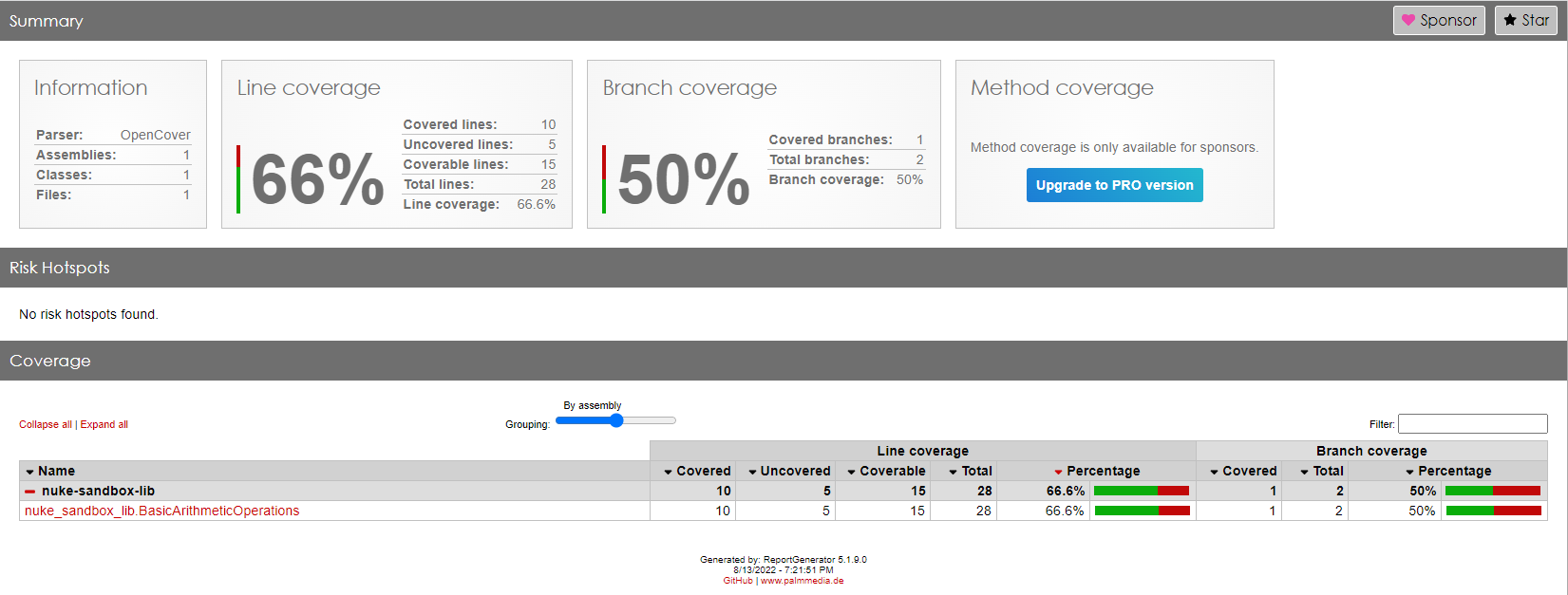
As we can see, the coverage threshold was not met because the line coverage and branch coverage are under 75%. Let's define the types of coverage used by Coverlet:
- Line Coverage: The percent of lines executed by this test run.
- Branch Coverage: The percent of branches executed by this test run.
- Method Coverage: The percent of methods executed by this test run.
In the following image, we can see the detail of the code covered by our test:
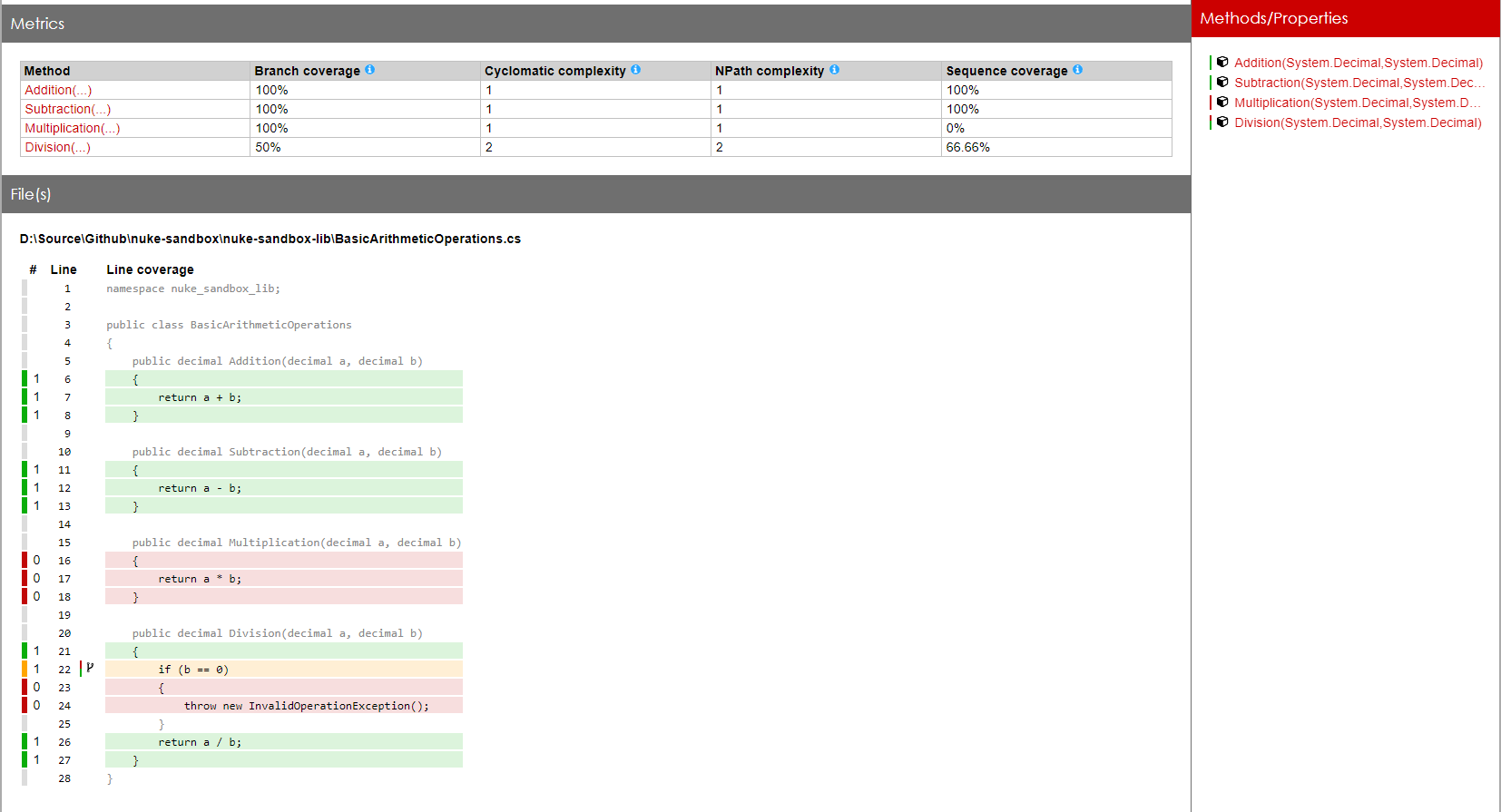
Let's add a new test to archive the minimum coverage threshold:
[TestMethod]
public void dividing_4_by_0_should_throw_an_exception()
{
    var sut = new BasicArithmeticOperations();

    Assert.ThrowsException<InvalidOperationException>(() => sut.Division(4, 0));
}
Run the nuke Report:
═══════════════════════════════════════
Target Status Duration
───────────────────────────────────────
Restore Succeeded 0:01
Compile Succeeded 0:02
Test Succeeded 0:02
Report Succeeded < 1sec
───────────────────────────────────────
Total 0:06
═══════════════════════════════════════
Build succeeded on 8/13/2022 7:50:42 PM. \(^ᴗ^)/
You can see all the code here. Thanks, and happy coding.
About the author
Somebody who likes to code
Comments
Join the discussionExcellent article Raul. Clear with plenty of examples. Thank you and well done.
Nuke
Nuke is an open source, cross-platform build automation solution for .NET projects. Nuke prides itself on its simplicity and extensibility that makes build automation approachable for everyone.